

Vaping has become a popular alternative to traditional smoking.
In the world of vaping, the experience is everything. From the flavor to the vapor production, every detail counts.
At the heart of it all lies the 510 vape battery, the powerhouse that brings your device to life.
Are you new to the world of vaping and feeling a bit lost on how to get started with a 510 vape battery? You’re not alone.
This guide will walk you through everything you need to know about using your vape battery effectively, ensuring a smooth and enjoyable experience.
What is a 510 Vape Battery?
The vape battery powers your vape pen, and it comes in various types.
Most vape pens or dab pens use a 510-thread battery, which is a universal standard that ensures compatibility across various devices.
So you can mix and match cartridges with your battery. This gives you the freedom to explore different products without buying new hardware every time.
The term “510” refers to the type of threading that connects the cartridge to the battery, indicates that threre are 10 threads at a 5mm length, each measuring 0.5 mm.
The 510 thread vape battery has emerged as a fundamental component, offering unparalleled versatility, compatibility, and reliability to enthusiasts worldwide.
Different Types of 510 Vape Batteries
Before you can operate one you have to ask yourself very quickly what type it is. The 510 Vape batteries can be either button-activated or draw-activated.
1. Button-Activated Batteries: Require you to press a button to activate the heating element, providing more control over your puff. Press the button to heat the cartridge and release it to stop.
2. Draw-Activated Batteries: Simply inhale through the mouthpiece, and the device activates automatically. These are perfect if you want the simplest experience possible.
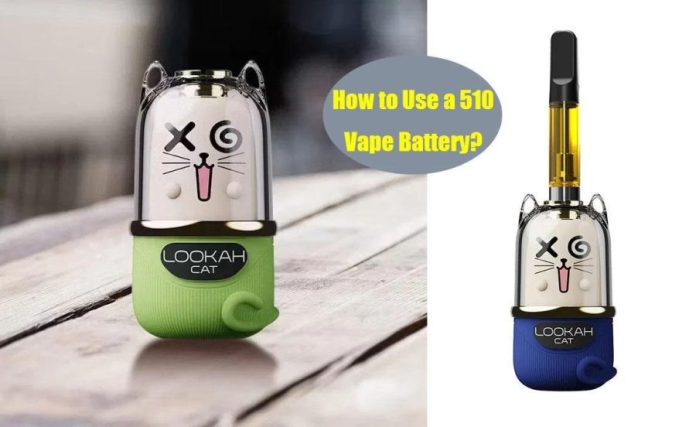
3. variable voltage Batteries: Many modern 510 vape batteries like Looah Cat also feature variable voltage settings, which act as a flavor and vapor intensity dial.
Lower voltage provides smoother, more flavorful hits, while higher settings produce thicker vapor clouds.
How to Use 510 Vape battery with Button?
Step 1: Screw the cartridge onto the battery, but be careful not to overtighten as this could damage the threads or the connection spring pin.
Most batteries feature light indicators that will flash to confirm the device is powered on.
Step 2: Press the power button 5 times quickly to turn it on.
Step 3 (optional): If your device has preheat function, press the button 2 or 3 times quickly to activate it, depending on your specific device.
Step 4 (optional): If your device has variable voltage settings, Press the button 2 or 3 times quickly to cycle through voltage levels, depending on your specific device.
Light indicators often change color to represent different voltage settings.
Step 5: Press and hold the button while inhaling. Release after each puff.
Step 6: When Not in Use, Press the button 5 times quickly to turn off your battery. This can save battery life and stay safe.
That’s all you need to do. Eventually, you’ll find the process easy to remember and repeat.
How to Use a Buttonless 510 Vape Battery?
For ultimate simplicity, buttonless 510 vape batteries are a perfect match. There are no buttons or complicated sequences to remember.
Simply inhale from the mouthpiece, and the pen automatically activates, heating your oil and delivering smooth vapor.
The key is to take smooth, even draws rather than sharp, quick puffs to avoid overwhelming the system.
Advanced Tips for Using a 510 Vape Cart Battery
Open up your vape pen’s full potential with these advanced techniques.
1. Avoid overtightening
Over-tightening can damage the delicate connector pins inside your battery or strip the threads.
Finger-tight is just right! Screw the cartridge on until it feels snug and doesn’t wiggle, then stop.
A proper connection means the cartridge sits flush against the battery with no gaps.
2. Temperature Control
Many batteries let you adjust voltage with 3 quick button clicks.
Each click cycles through different heat levels, usually indicated by colored lights.
Green/white is low heat (best flavor), blue is medium (balanced flavor/vapor), and red is high heat (biggest clouds).
Start low and work your way up.
3. Use Preheat Function
Preheat Function is an absolute game-changer for thicker oils or in cold weather.
Typically, Press the button twice quickly to activate it. The vape gently warms the oil for 10-15 seconds, preventing clogs and ensuring a smooth first hit. You can stop preheating by pressing the button once.
4. Inhalation Technique
For the best flavor, try drawing vapor into your mouth for 1-2 seconds, pausing to let the flavors register, then inhaling into your lungs. This helps you appreciate the full flavor profile.
Effectively using your vape is about finding your personal sweet spot. Experiment to find what works best for you.
Troubleshooting Common Issues
Sometimes, your vape battery might not function as expected. Here are a few common problems and their solutions:
1. Battery not work and flash red
If your vape battery not work and flash red, this is often a signal that the battery charge has dropped below a certain threshold (e.g., under 30%) and needs recharging.
Fix:
Most vape batteries come with a USB-C or Micro-USB charging port on the bottom or side. use a USB Cable to Connect the battery to a reliable 5V power source.
Avoid rapid chargers as they can overheat the battery and reduce its lifespan
A red light during charging usually means it is charging, and a green light (or the light turning off) means it is full.
2. Battery not work and flash yellow
If your 510 vape battery not work and flash yellow, this usually indicates a connection problem (open or short circuit).
Residue, oil leaks, or debris on the contact points can interfere with the electrical flow between the battery and the cartridge. The cartridge might also be screwed on too tightly or too loosely.
Fix:
Unscrew the cartridge and use a cotton swab lightly moistened with isopropyl alcohol (rubbing alcohol) to gently clean the contact points on both the battery and the cartridge. Ensure everything is completely dry before reattaching.
3. Overheating
Prolonged, continuous use can cause the device to overheat, and the red light may flash as a warning.
Fix:
Stop using the device immediately and allow it to cool down at room temperature before using it again.
4. Weak vapor production
If your hits are feeling weak, it’s usually due to a low battery, clogged airflow, or not enough heat.
Fix:
Start by charging the battery fully. If that doesn’t do the trick, check for and clear any blockages.
If your device allows, try increasing the voltage or temperature settings to see if that improves the vapor production as a last measure.
In Conclusion
Using a 510 vape battery is straightforward once you understand the basics.
By following the steps outlined in this guide, you’ll be able to enjoy a consistent vaping experience while avoiding potential perils of mishandling.
Stay safe, savvy, and satisfied with your vape!