


Film and television assets are too large, valuable, and time-sensitive for ad hoc sharing. An Enterprise File Transfer approach gives studios, broadcasters, post-production houses, VFX teams, animation studios, and game companies a controlled way to move camera originals, edit masters, dailies, project folders, and final deliveries. Enterprise Large File Transfer should keep throughput useful across distance while preserving security and evidence of what happened to each file.
The second requirement is repeatability. Managed File Transfer turns recurring deliveries into defined jobs with owners, schedules, notifications, and logs. That matters when a broadcaster receives daily packages, a studio sends review exports to several partners, or a rendering pipeline produces hundreds of outputs overnight.
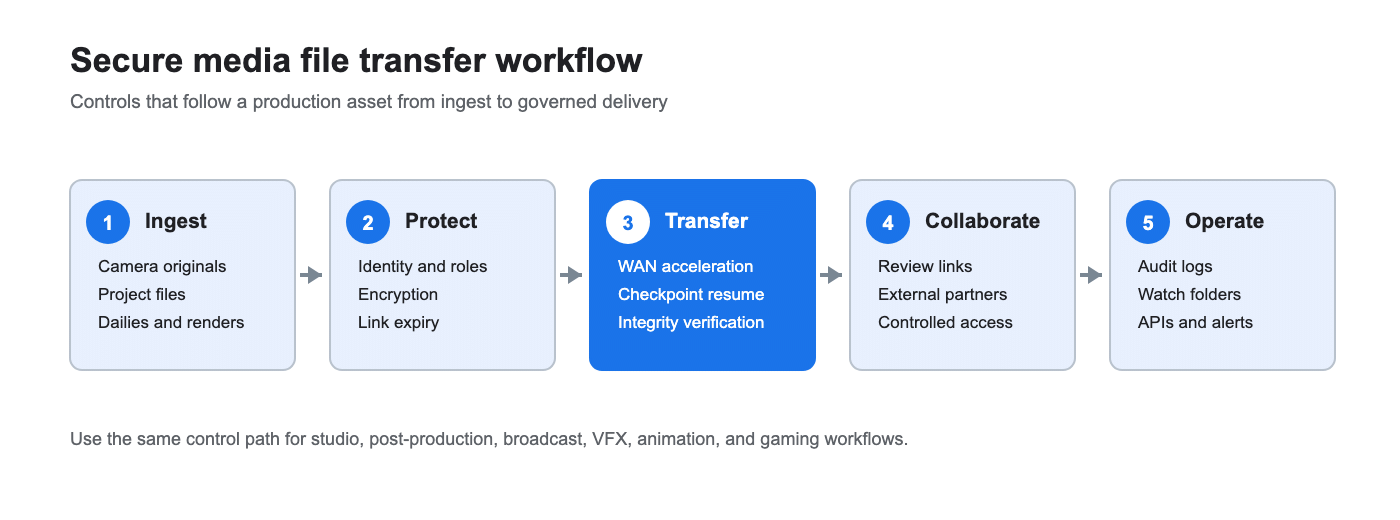
Why do media companies need specialized file transfer?
Media workflows combine very large files with tight release windows and many handoffs. A single production may move raw footage from set to central storage, proxies to editorial, high-resolution plates to a VFX vendor, review cuts to a client, and a final master to a distributor. Those transfers often cross offices, cloud regions, vendors, and home networks.
Consumer sharing links and ordinary FTP can become operational blind spots. Teams may not know whether a transfer is complete, whether a link is still active, or who downloaded a sensitive cut. A specialist platform should give creative teams a simple exchange while giving IT policy, visibility, and recovery controls.
Implementing Managed File Transfer helps establish control and tracking over these critical media workflows.
Which media workflows should a buyer support?
Map the full chain before comparing products. Common patterns include:
| Workflow | Operational requirement | Controls to verify |
|---|---|---|
| Dailies and camera originals | High-volume ingest from sets or facilities | Parallel transfer, queueing, resume, checksum or hash verification |
| Editorial and post-production | Frequent movement of project files, proxies, and renders | Version discipline, folder permissions, notifications, searchable history |
| VFX and animation | Cross-border exchange of plates, shots, and caches | WAN performance, selective sync, partner access, predictable retries |
| Broadcast delivery | Scheduled packages to stations, platforms, or affiliates | Automation, delivery confirmation, retention rules, audit logs |
| Game development | Large builds and assets for distributed teams | Role-based access, expiring links, API or CLI integration |
Controlled collaboration also needs a governed workspace. Enterprise File Sync and Share capabilities can support review and sharing between creative teams and external partners when administrators can set permissions, restrict links, and see access activity. Collaboration features should complement the transfer engine rather than replace production storage or asset management systems.
What are the essential security and performance requirements?
Large files, high volume, and long distance
Ask how the platform handles multi-gigabyte and multi-terabyte jobs, many small files, and concurrent transfers. The useful measure is sustained completion time on your paths, not a headline speed under ideal conditions. Test representative codecs, folder structures, and simultaneous users.
Latency and packet loss
Round-trip time and packet loss reduce the efficiency of conventional single-flow TCP transfers over long routes. A suitable platform should adapt to network conditions, use acceleration where permitted, and fall back safely when a network blocks a transport. Validate performance from the actual offices, cloud regions, and vendor sites you use.
Resume and verification
Checkpoint resume should continue an interrupted job from its last confirmed point. Transfer verification should compare file integrity after delivery, using a documented checksum or hash process. Together they reduce rework when a VPN drops, a workstation sleeps, or a regional link becomes unstable.
External sharing and content protection
External links should support authentication, scoped permissions, expiration, and revocation. For screeners, dailies, and unreleased cuts, pair link controls with watermarking or a dedicated review system when visual deterrence and forensic tracking are required. Do not assume a transfer platform’s access controls provide watermarking by themselves.
Audit logs and download visibility
Look for searchable records of uploads, downloads, shares, sync jobs, administrator actions, timestamps, IP addresses, outcomes, and errors. Logs should answer who accessed a file, when, from where, and whether the transfer completed. Retention and export options matter when a studio must investigate a leak or demonstrate process compliance.
NIST describes TLS as providing authentication, confidentiality, and integrity protection for data in transit. Buyers should therefore check protocol versions, certificate management, encryption at rest, key ownership, and identity integration instead of accepting the word “secure” as a specification.
How does Enterprise Large File Transfer support production assets?
Enterprise Large File Transfer is the performance layer for moving large assets between storage systems, facilities, and partners. Raysync Enterprise combines proprietary UDP-based WAN acceleration with intelligent UDP/TCP switching, peer-to-peer transfer, checkpoint resume, and transfer verification. Its security controls include AES-256 encryption in transit and at rest, TLS transmission options, role-based administration, audit logs, and secure sharing links.
For a media IT team, the practical evaluation is straightforward: run the same job over a high-latency path, interrupt it, resume it, and verify the delivered file. Then test concurrent deliveries and confirm that administrators can restrict access and review download activity. Raysync Enterprise also exposes REST API, SDK, and CLI interfaces for pipeline integration. Pricing is customized, so model the cost against your recurring volume, users, storage pattern, and support requirements.
When is Managed File Transfer the right model?
Managed File Transfer fits predictable, repeatable exchanges. Use it for daily station feeds, automated vendor handoffs, ingest from watch folders, render completion triggers, and scheduled archive copies. Define the source, destination, schedule or event, file filters, retry behavior, notification path, and owner.
The workflow should fail visibly. A useful MFT service reports success or failure, preserves transfer history, retries within defined limits, and alerts the right team. APIs, SDKs, and command-line tools help connect transfer jobs to media asset management, orchestration, transcoding, ticketing, and cloud storage systems. Keep credentials in a managed identity or secrets system and rotate them according to policy.
How should cloud, on-premises, and hybrid approaches be compared?
Cloud delivery can simplify partner access and regional distribution. Self-hosted deployment may fit facilities that need local control, existing storage proximity, or strict network boundaries. Hybrid designs often place transfer nodes near production storage while using cloud capacity for burst delivery or external collaboration.
Compare the complete operating model: egress charges, storage and retention, node licensing, support, patching, identity integration, monitoring, and disaster recovery. For recurring transfers, request a transparent pricing example that includes peak periods, retries, additional sites, and inactive users. A predictable monthly or annual cost is easier to budget than a low entry price followed by variable transfer and storage fees.
Buyer checklist for secure media file transfer
- Can it handle large files, many files, and concurrent jobs on your real network paths?
- Does checkpoint resume continue after interruption, and is integrity verification documented?
- Are encryption in transit and at rest, certificates, keys, and identity integrations configurable?
- Can administrators set roles, folder permissions, link expiry, revocation, and download limits?
- Are watermarking and review controls available directly or through an integrated review platform?
- Do logs cover file access, downloads, shares, sync, configuration changes, and failures?
- Can watch folders, schedules, event triggers, APIs, SDKs, and CLIs automate delivery?
- Does the deployment fit cloud, on-premises, or hybrid requirements without duplicating administration?
- What is included in the recurring price, and how are volume, sites, storage, and support measured?
- Can the vendor run a trial using your codecs, folder structures, distances, and security policies?
FAQ
What is the safest way to send large video files?
Use an enterprise transfer service with encryption, identity-based access, expiring links, checkpoint resume, integrity verification, and audit logs. Test it with representative files and the network paths used by your partners.
Is FTP enough for a media production workflow?
FTP can move files, but it may lack the acceleration, recovery, granular sharing controls, and operational evidence required for distributed production. A governed transfer platform is easier to standardize and monitor.
How do media teams reduce failed transfers?
Use checkpoint resume, adaptive transport, verification, defined retries, and alerts. Keep transfer nodes close to source and destination storage and measure performance during peak workloads.
Should a studio choose sync and share or managed transfer?
Use sync and share for controlled collaboration and review. Use managed transfer for scheduled or event-driven system-to-system delivery; many enterprises need both.
How long should an external download link remain active?
Set the shortest period that matches the review or delivery window, require authentication for sensitive assets, and revoke the link when the job ends. Record downloads so the owner can confirm access.
Conclusion
Secure media file transfer is a workflow decision that joins performance, protection, and proof. Start with your largest assets, longest routes, recurring deliveries, external partners, and audit obligations. Then benchmark an Enterprise Large File Transfer platform under real conditions, automate repeatable jobs through Managed File Transfer, and give creative teams controlled collaboration. Raysync Enterprise is a practical option to evaluate when you need acceleration, recovery, governed sharing, and integration in one enterprise plan. Request a trial using your own media workflows and price the deployment against recurring transfer demand.