

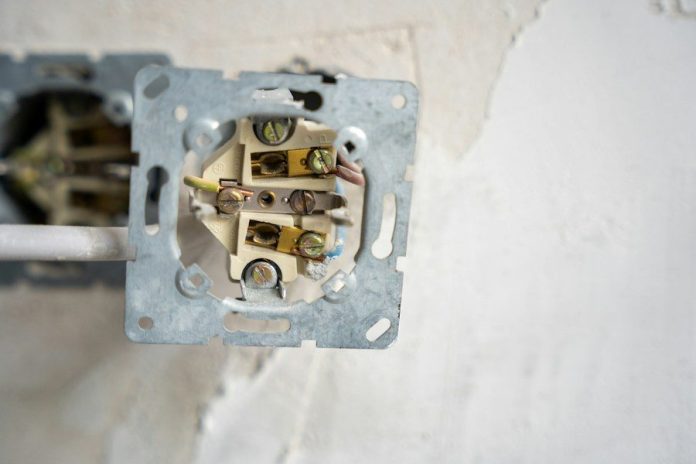
A well-planned smart home needs reliable electrical, network, and low-voltage wiring. Smart house wiring connects Ethernet, power, controls, audio, security, and other systems throughout the property.
The best time to plan these connections is before you close walls, though you can also upgrade existing homes. This guide shows how to plan the wiring. It covers wiring from the electrical panel to cameras. It also covers wiring to entertainment systems, climate controls, and network equipment.
This guide covers Cat6 and Cat6A, fiber, PoE, network planning, central racks, retrofits, safety, and cable management. It also explains how to prepare for lighting, cameras, audio, TVs, climate systems, access points, EV charging, and future upgrades.
Key Takeaways
- Plan smart home wiring before walls are closed whenever possible. Early planning makes it easier to place Ethernet, power, cameras, access points, and control wiring correctly.
- Use the right cable for each purpose, such as Cat6 or Cat6A for networking, fiber for high-bandwidth links, and speaker cable for permanent audio systems.
- Centralize, label, and document cable runs so future repairs and upgrades are easier. Spare conduit, network ports, and rack space can also reduce the need for major remodeling later.
- Keep electrical and low-voltage wiring properly separated and sized for the devices being installed. Smart switches, thermostats, EV chargers, and other equipment may require specific wiring or electrical capacity.
Why Wiring Still Matters in a Smart Home
Wireless products are useful, but wired devices often work better. Ethernet can give televisions, computers, cameras, access points, and touchscreens a stable connection. It also reduces the number of devices that depend only on the wireless network.
Smart home wiring should focus on infrastructure first and individual products second. Cables inside walls may stay useful for many years, even when cameras, hubs, speakers, and controllers change. This makes careful cable planning one of the best ways to future-proof a connected home.
How to Organize Smart Home Wiring
Choose a central location where network, audio, security, and automation cables can meet. A rack or structured wiring cabinet can hold switches, patch panels, controllers, and related equipment. The area should have enough space, power, airflow, and access for future service.
A clear layout can make repairs and future changes much easier:
- Run Ethernet and other low-voltage cables back to one central point.
- Label both ends of every cable.
- Record the room, wall, device, and purpose of each connection.
- Add conduit between key areas where possible.
- Leave open network ports and rack space for future equipment.
Good records are just as useful as the cables themselves. A homeowner or technician should be able to identify each connection without tracing wires through walls. This is a major part of organizing smart home wiring in a practical way.
Choose the Right Type of Cable
Cat6 works well for many home network connections. Cat6A offers more capacity and may be useful for demanding network or Power over Ethernet applications. Fiber can also make sense between buildings, equipment areas, or locations that need high bandwidth over longer distances.
Other cable types still have important uses:
- Cat6 or Cat6A for Ethernet, cameras, access points, and PoE devices.
- Fiber for high-bandwidth or longer-distance network links.
- Coax for some television, antenna, satellite, and AV systems.
- Speaker cable for wall, ceiling, outdoor, and theater speakers.
- Low-voltage cable for compatible sensors, keypads, and control systems.
The best cable type depends on distance, data needs, device requirements, and local code rules. Avoid choosing every cable based only on the equipment being installed today. The wiring may remain in place much longer than the connected hardware.
Plan Ethernet, PoE, and Wi-Fi Coverage
Hardwired Ethernet can reduce demand on the wireless network. Consider Ethernet at televisions, offices, cameras, media centers, wall controls, and ceiling locations for access points. A smart speaker may use Wi-Fi, but it still needs reliable coverage and a nearby power source.
Power over Ethernet, known as PoE, can send data and power through the same network cable. Compatible cameras, access points, sensors, touchscreens, and other smart home devices may use this method. It can reduce the number of separate power supplies required around the house.
Different PoE standards provide different amounts of power. Before connecting multiple devices, check whether the equipment requires PoE, PoE+, or PoE++. The network switch must also provide enough total power for all connected equipment.
Wire Each Room Around Its Function
Room-by-room planning reduces the risk of missing important connection points. Living rooms may need Ethernet behind the television, speaker wiring, AV pathways, and power near wall-mounted displays. Bedrooms may benefit from network connections near likely desk or television locations.
Plan these common locations before walls are finished:
- Security cameras near doors, driveways, yards, and other key areas.
- Ceiling Ethernet for wireless access points on each floor.
- Speaker wiring in kitchens, living rooms, patios, and theater areas.
- Ethernet and power behind televisions.
- Wiring for shades, sensors, keypads, and compatible lighting.
- Garage capacity for cameras, networking, energy equipment, and EV charging.
Outdoor and utility areas may require different cable ratings or added protection. These details are easier to handle during construction than after insulation, drywall, and exterior finishes are complete. A room-by-room plan can also reduce the need to open walls later.
Plan Lighting and Climate Controls Before Installation
Smart switches can take up more space inside an electrical box than standard switches. Before installing smart lighting controls, check the box depth and the wiring the product requires. Some devices need a neutral wire, which older switch boxes may not have.
Climate controls require the same level of planning. A smart thermostat may need constant power or an extra conductor that an older thermostat cable does not provide.
The U.S. Department of Energy explains that smart thermostats can automatically adjust heating and cooling based on occupancy, schedules, and other conditions. The wiring should also match the needs of the HVAC system and the thermostat manufacturer.
These details matter because replacing a wall switch or thermostat is not always a simple device swap. The existing electrical system must safely support the new product. Planning ahead gives homeowners more choices when equipment changes.
How to Remodel Smart Home Wiring
Existing homes require a different strategy because finished surfaces limit cable routes. Electricians and low-voltage professionals may use attics, basements, crawl spaces, closets, and existing chases before opening walls. Accessible conduit can also provide a route for future cable additions.
When planning a smart home electrical installation during a remodel, start with the infrastructure that is hardest to add later.
Network backbones, camera wiring, access-point locations, entertainment connections, and major electrical work often deserve priority. Plug-in products are usually much easier to replace or relocate.
Homeowners do not need to fill every wall with unused cable. A better approach is to provide spare pathways and connections in areas where needs are likely to change. This keeps the home flexible without adding unnecessary material.
Keep Electrical and Low-Voltage Work Safe
You should not place low-voltage network cable and line-voltage wiring together without considering electrical code requirements. Rules may control separation, approved pathways, boxes, cable types, and how different circuits enter the same space.
The National Fire Protection Association publishes the National Electrical Code, which provides requirements for safe electrical installations. Local requirements can also affect permits and inspections.
The electrical system must have enough capacity for planned equipment and larger loads. New circuits, service changes, EV charging, and work inside an electrical panel may require a professional electrician. This is especially important when automation projects involve both low-voltage and standard electrical wiring.
A qualified Bergen County, NJ electrician can review the electrical side of the project and coordinate with network or automation specialists. This can help keep power, networking, lighting, and smart control equipment properly separated and organized.
Build Around a Central Smart Home System
A good smart home system should not depend on one generation of products. Keep core networking, power, and structured cabling accessible so you can swap individual devices over time. This reduces the need to rebuild infrastructure when a product line or platform changes.
The same idea applies to smart home technology that uses cloud services or proprietary hubs. Networking, lighting, climate control, and security should have dependable physical infrastructure beneath the software layer. Control systems can then focus on automation and user preferences rather than fixing weak connections.
This also makes future upgrades easier. A new controller, camera, access point, or entertainment device can often use the same cable already in place. The homeowner gains more flexibility without repeating major construction work.
Leave Capacity for What Comes Next
No one can predict every device a homeowner may want five or ten years from now. Spare Ethernet runs, empty conduit, extra rack space, accessible junction points, and clear wiring diagrams create room for change. These additions are often easiest and least disruptive during construction or remodeling.
It also helps to leave capacity where technology use is likely to grow. Offices, media rooms, ceilings, exterior camera locations, garages, and central equipment areas are good examples.
Running one extra cable during construction is often simpler than creating a new path later. Good planning does not mean installing every possible connected product. It means creating an electrical and network foundation that can support changing needs.
When you understand how to organize smart home wiring around reliable connections, clear documentation, spare pathways, and safe electrical work, future upgrades become much easier.