

Want to save a trending Reel sound, a useful voiceover, a podcast clip, or background music without downloading the whole video? A powerful Instagram downloader lets you paste the link to a public Reel, video, Story, or post and save its available sound track as an MP3 file.
Unlike a standard Instagram video downloader, an audio extractor removes the visuals and gives you a smaller, standalone file that is easier to play offline, study for content ideas, or keep as a personal reference. Most tools follow the same basic process: copy the Instagram link, paste it into an Instagram audio converter, then download the processed MP3.
This guide compares 7 best free Instagram audio download tools, with a focus on supported content types, available audio formats, device compatibility, output quality claims, and the situations where each option makes the most sense.
Use audio responsibly: These Instagram audio saver tools should be used for your own content, personal reference, offline listening, or material you have permission to use. Downloading an audio file does not give you the right to repost, distribute, monetize, or commercially reuse copyrighted music or another creator’s original sound.
Quick Comparison
| Instagram audio downloader | Best for | Supported Instagram content | Output |
|---|---|---|---|
| Snapgram | Broad audio extraction | Reels, videos, Stories, Highlights, IGTV | 320 kbps
MP3 |
| Faceless | Creators and trend research | Public Reels and video posts | MP3 |
| IGExport | Browser-based conversion | Public Reels, videos, carousels, IGTV | 128 kbps MP3 |
| InstaLoadr | Mobile instructions and troubleshooting | Public Reels and video posts | MP3 |
| ReelSaveApp | More format flexibility | Instagram Reels | MP3, M4A |
| StoriesIG | Fast Reel-audio extraction | Public Instagram Reels | MP3 |
| ReelToAudio | Minimal Reel-to-MP3 workflow | Public Reels and videos | MP3 |
Snapgram supports one of the broader sets of content types in this group, including Reels, feed videos, Stories, Highlights, and IGTV. Several alternatives focus only on public Reels and standard video-post URLs.
Top 7 Free Instagram Audio Downloader Tools Online
1. Snapgram
Best for: Downloading audio from multiple Instagram media formats, not only Reels.
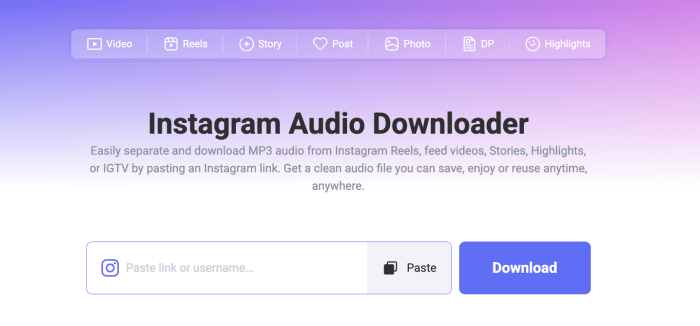
Snapgram Instagram Audio Downloader lets users paste a public Instagram URL and extract the available audio as an MP3. It is positioned for Reels, feed videos, Stories, Highlights, and IGTV, making it a strong all-in-one option if you regularly save different types of Instagram audio.
The process is simple: copy the link in Instagram, paste it into Snapgram, let the tool detect the content, then download the extracted MP3. Snapgram says audio processing usually takes only a few seconds and promotes high-quality MP3 output, with up to 320 kbps where the source permits.
Key Features
- Supports audio conversions from Instagram Reels, feed videos, Stories, Highlights, and IGTV.
- Extracts available audio into MP3.
- Works on any phones and computers through a browser.
- No app installation or Instagram sign-in for public content.
- High-quality output of up to 320 kbps when supported by the original source.
Need the original visuals too? Use Snapgram as an Instagram Reel downloader when you want to save the video and audio together instead of creating an MP3-only file.
2. Faceless
Best for: Creators saving Reel sounds for inspiration, analysis, or offline reference.
Faceless extracts audio from public Instagram Reels and standard video posts. It accepts public instagram.com/reel and instagram.com/p links, then returns the available sound track as an MP3.
The page is particularly useful as a model for responsible messaging. It frames downloaded audio as material for studying trends, editing style, pacing, and viral formats—not as automatic permission to publish someone else’s music or sound.
Key Features
- Supports public Reels and video posts.
- Converts the available track to MP3.
- No login or software installation required.
- Useful for trend research, voiceover analysis, and personal listening.
- Clearly reminds users that a download does not provide a commercial-use licence.
3. IGExport
Best for: Users who prefer a browser-based Instagram-to-MP3 converter with a transparent bitrate policy.
IGExport converts public Instagram Reels and video posts into MP3 files in the browser. The site says conversion happens on the user’s own device rather than through file uploads to its servers.
IGExport outputs audio at 128 kbps and explicitly explains that increasing the bitrate cannot restore quality already lost in Instagram’s compressed source file. That makes it a practical option for voiceovers, dialogue, spoken clips, and casual offline listening where consistency matters more than an inflated bitrate claim.
Key Features
- Supports public Reels, video posts, older IGTV content, and video carousels.
- Outputs standard 128 kbps MP3 files.
- States that conversion happens locally in the browser.
- Works on iPhone, Android, and desktop browsers.
- No login or app download required.
4. InstaLoadr
Best for: Beginners who need help downloading Instagram audio on iPhone, Android, or desktop.
InstaLoadr extracts the audio track from public Reels and video posts and saves it as an MP3. Its biggest advantage is the supporting guidance: it explains how to copy a link, where files are saved on different devices, how to resolve common errors, and why direct extraction is cleaner than screen recording.
It also explains a technical point many tools skip. If an Instagram Reel includes voiceover, music, sound effects, and ambient audio, the downloaded MP3 contains the completed mix. It cannot split the finished track back into individual layers.
Key Features
- Converts public Reels and video posts to MP3.
- Includes iPhone, iPad, Android, Windows, and Mac instructions.
- Explains common failed-download causes.
- Helps users locate saved MP3 files.
- Clarifies that mixed Reel audio remains a single mixed track.
5. ReelSaveApp
Best for: Users who want an Instagram Reel audio downloader with possible MP3 and M4A choices.
ReelSaveApp is a browser-based tool for converting Instagram Reel audio. Its workflow follows the standard pattern: copy a public Reel URL, paste it into the converter, start processing, and choose an available output option.
The page promotes MP3 conversion and also references M4A format support. That may be helpful for people who prefer an alternative audio container for playback or editing, although the exact formats offered can depend on the source and current tool availability.
Key Features
- Focused on downloading audio from Instagram Reels.
- Promotes MP3 and M4A output formats.
- Browser-based on desktop and mobile.
- No separate application required.
- Suitable for saving music clips, dialogue, and voiceovers for personal reference.
6. StoriesIG
Best for: Fast, no-frills extraction of sound from public Instagram Reels.
StoriesIG’s Instagram Reels Audio Downloader is designed for a direct four-step Reel-to-MP3 workflow. Find a public Reel, copy the link, paste it into the downloader, and save the extracted audio file.
StoriesIG says it provides the full sound from the Reel as a standard MP3 and does not add a watermark to the audio file. This is a good fit when your input is specifically a public Reel rather than a Story, Highlight, or general Instagram video.
Key Features
- Built specifically for public Instagram Reel audio.
- Uses a short copy-link, paste-link, download workflow.
- Saves the audio as MP3.
- States that the full Reel audio duration is retained.
- No app or account sign-up required.
7. ReelToAudio
Best for: A dedicated, minimalist Instagram Reel-to-MP3 page.
ReelToAudio focuses on converting public Instagram Reel and video links into standalone audio files. This type of tool suits users who do not need a larger Instagram utility suite and want to move directly from a public Reel URL to an MP3.
Its simple positioning makes it a reasonable backup option for occasional audio downloads, such as saving a trending sound, short quote, language-learning clip, or voiceover reference.
Key Features
- Dedicated to Instagram audio extraction.
- Intended for public Reels and video links.
- Designed around an MP3-focused workflow.
- Suitable for mobile and desktop browser use.
Keep in mind: The website could not be fully retrieved during this review, so confirm its current output formats, supported content, privacy policy, and download behavior before relying on it for regular use.
How to Choose the Best Instagram Audio Downloader?
A useful Instagram audio saver should do more than simply show a “Download” button. Before choosing one, check these essentials:
- Public-link support: The tool should clearly say it works with working Instagram links. Deleted Reels, age-restricted content, and login-only posts generally cannot be processed.
- Audio-only output: Confirm that the result is an MP3, M4A, WAV, or other audio file—not just an MP4 video download.
- Supported media types: A Reel-only tool may be enough for trending sounds. If you need Stories, Highlights, feed videos, or IGTV audio, use a broader converter such as Snapgram.
- Realistic quality messaging: “Up to 320 kbps” can be useful, but it cannot improve an already compressed Instagram source. IGExport’s explanation of its 128 kbps output correctly highlights this limitation.
- No-login workflow: For public links, there is usually no reason to provide your Instagram password to a third-party audio converter.
- Clear privacy information: Avoid tools that do not explain what they retain, how long files are stored, or which permissions they require.
- Mobile download instructions: On iPhone, completed MP3s often appear in Safari Downloads or the Files app; Android files generally go to the Downloads folder.
- Copyright-respectful wording: An audio extractor can create a file, but it cannot provide rights to use copyrighted sound in your own content.
FAQs about Downloading Audio from Instagram
Can I download audio from Instagram Reels as MP3?
Yes. For public Reels, copy the Reel link from Instagram, paste it into an Instagram audio downloader such as Snapgram, then save the extracted audio as an MP3.
Can I download Instagram Story audio?
Some tools support public Story links, while others are limited to Reels and standard video posts. Snapgram and Toolzin support audio ripping from Stories, while InstaLoadr focuses its audio extractor on Reels and video posts and recommends a separate Story-download route for Story content.
Why is my Instagram audio download not working?
Common causes include a private account, an incomplete or outdated link, a deleted Reel, restricted content, a video without available audio, or a temporary browser/download error. Copy the URL again from Instagram’s Share menu, confirm the post is public, refresh the tool, and try an updated browser.storiesig+1
Does converting to 320 kbps make Instagram audio better?
No. A higher export bitrate cannot restore sound detail that has already been compressed or removed from the source Instagram file. It can preserve the available source within the output settings, but it cannot create true higher fidelity.
Can I separate music from voiceover in a downloaded Reel?
Usually not through a standard Instagram audio downloader. If the Reel was posted with music, narration, sound effects, and ambient noise mixed together, extraction returns the completed mixed track. It does not isolate separate audio stems.
Is downloading Instagram audio legal?
It depends on the content and how you use it. Saving your own content, keeping an authorized file, or listening privately may be permitted in relevant circumstances, but downloading a file does not grant copyright ownership or permission to repost, distribute, monetize, or use another person’s music or original audio commercially.