

Our Rating: 4.8 / 5 ★★★★☆
Most VPN reviews focus on whether a service is fast enough for streaming or cheap enough to justify a subscription. Those things matter, but they are not the questions privacy-sensitive users ask first. People who actually care about privacy want to know whether a VPN leaks, whether its no-logs policy is backed by something more than a marketing page, what jurisdiction the company sits under, and whether the security tools work the way they are described.
This 2026 review of X-VPN is written with that audience in mind. The short version: X-VPN holds up surprisingly well under privacy-focused scrutiny. It passed our leak tests, runs on strong encryption, has completed a third-party no-logs policy audit, and is also fast and reliable enough to use for everyone.
| Category | Rating |
|---|---|
| Overall | 4.8 / 5 |
| Leak Protection & Encryption | 4.8 / 5 |
| Protocol Transparency | 4.7 / 5 |
| Speed & Stability | 4.7 / 5 |
| Streaming | 4.7 / 5 |
| Apps & Usability | 4.6 / 5 |
How We Tested X-VPN
For this review, we used X-VPN on Windows, and the testing was split into two phases. The first phase focused on privacy and security: leak testing, encryption checks, kill switch behavior. The second phase looked at everyday usability: speed, streaming, app design, because a VPN that is uncomfortable to use during normal browsing tends to get switched off, which defeats the point.
Speeds were measured on a high-bandwidth test line, so the raw Mbps figures will be higher than what a typical home user sees. The pattern matters more than the numbers: how much of the baseline speed survived once the VPN was connected, and whether long-distance servers stayed close to local ones.
Leak Tests: No IP, DNS, or WebRTC Exposure
Leak testing is the first thing a privacy-sensitive user should care about, because everything else a VPN claims becomes meaningless if the connection quietly exposes the real IP, DNS queries, or WebRTC information to the wider internet.
We ran X-VPN through three standard leak checks across multiple server locations.
IP leak test
With the VPN connected to a US server, the public IP returned by ipleak and browserleaks matched the VPN endpoint, not the real address. We repeated this on UK and Germany servers; the result was the same each time. No fallback to the real IP occurred during the session.
DNS leak test
Using dnsleaktest’s extended test, all DNS queries are resolved through X-VPN’s own resolvers rather than the local ISP’s. Across three different server locations, no third-party DNS server appeared in the results.
WebRTC leak test
WebRTC is the most common source of accidental exposure, because browsers can reveal the local IP through STUN requests even when a VPN is active. We checked WebRTC behavior in Chrome and Firefox on browserleaks. The local IP was not exposed in either browser while X-VPN was running.
Kill switch behavior
We tested this by forcing a connection drop mid-session (cutting the VPN tunnel manually while a download was active). The kill switch engaged, network traffic was cut, and the connection did not silently fall back to the unprotected interface. Once the VPN reconnected, traffic resumed normally.
For users who care about privacy, this is the part of the review that matters most. A VPN that fails any of these tests is not a privacy tool, regardless of what its marketing page says. X-VPN passed all of them under default settings, without having to manually adjust anything.
Encryption: AES-256 and Advanced Technologies
X-VPN uses AES-256 encryption, which remains the standard for VPN traffic and is not realistically breakable by brute force with current technology. That covers the baseline.
What sets X-VPN apart for more privacy-focused users is the inclusion of post-quantum encryption. This is forward-looking protection against an attack model where future quantum computers could threaten today’s encryption algorithms.
Tor over VPN is also available, which lets users route traffic through the Tor network after the VPN tunnel. This is not something most people need, but for users who want an extra layer of separation between their identity and their activity, the option being available without third-party setup is a meaningful convenience.
On top of encryption, X-VPN also includes a browser protection suite covering tracker blocker, search protection, malicious website blocker, download protection, cookie blocker, URL cleaner, and ad blocker. Together, these tools extend X-VPN’s protection to everyday browsing.
Privacy and No-Logs: Audited, Not Just Claimed
X-VPN follows a no-logs policy and has completed a third-party no-logs audit. It does not collect browsing history, visited websites, DNS queries, user IP addresses, downloaded content, VPN connection timestamps, destination IP addresses, VPN servers used, or sensitive payment details.
Jurisdiction is the other context worth noting. X-VPN is operated by LightningLink Networks Pte. Ltd., based in Singapore, which is not part of the Fourteen Eyes intelligence-sharing arrangements. The combination of audited no-logs policy plus a jurisdiction outside major surveillance alliances gives X-VPN a stronger overall privacy posture now.
Protocol Choice: Transparent Control for Different Needs
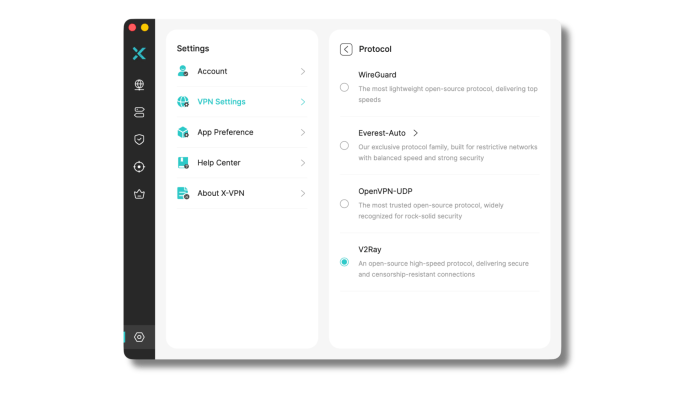
Protocol choice is another area where X-VPN does well. The service supports open-source protocols like WireGuard, OpenVPN, V2Ray, and Everest, its proprietary protocol. That gives users several transparent options depending on what they want from the connection.
Just as importantly, these protocol options are easy to find. You can go to the Protocol section in VPN Settings and choose the protocol you want directly by name. That makes X-VPN feel more transparent than VPN apps that hide protocol selection or only offer vague automatic modes.
X-VPN keeps the experience approachable, but it does not remove control. That balance is important. New users can connect without touching protocol settings, while more technical users can choose a protocol based on speed, stability, trust, or network conditions.
Speed and Stability: Strong Numbers Across Distance
Privacy-sensitive users care about speed too. A VPN that protects your privacy but slows everything down is a VPN you will use less often, and that defeats the point.
X-VPN performed well here. Speeds on our Windows test environment:
| Test Scenario | Download Speed |
|---|---|
| No VPN baseline | 3506 Mbps |
| Local server | 2794 Mbps |
| UK server | 2676 Mbps |
| Germany server | 2728 Mbps |
| US server | 2764 Mbps |
The local server was expectedly the fastest VPN-connected result, but the more useful finding was how closely the long-distance servers stayed together. The UK, Germany, and US results all remained in a similar range, without the sharp drop-off that often appears when a VPN struggles with routing distance.
That consistency matters more than a single impressive number. In everyday use, a VPN feels fast when pages load without hesitation, video starts quickly, and switching between servers does not create a stop-start experience. X-VPN felt smooth in that sense. Browsing stayed responsive, video playback started quickly, and the connection did not feel unstable during repeated server changes.
Absolute speeds will vary depending on your device, location, network quality, and chosen server. Still, based on our results, X-VPN handled both nearby and long-distance connections very well.
Streaming: Reliable Access Across Major Platforms
Streaming is one of the areas where X-VPN feels especially competitive. It is one thing for a VPN to technically open a streaming site. It is another thing for playback to remain stable after the video starts, especially on platforms that are known for detecting VPN traffic.
In our testing, X-VPN worked with a wide range of major streaming platforms, including Netflix, Hulu, BBC iPlayer, Amazon Prime Video, Disney+, YouTube TV, ESPN, and HBO Max / Max. Netflix was one of the more useful tests because support for one library alone does not tell the full story. X-VPN was able to access multiple Netflix libraries, including the US, Australia, Canada, Japan, South Korea, Spain, and the UK.
| Platform | Result | 4K Playback |
|---|---|---|
| Netflix | Unblocked multiple libraries including US, AU, CA, JP, KR, ES, and UK | Stable |
| Hulu | Unblocked US library | Stable |
| BBC iPlayer | Unblocked UK content | Stable |
| Amazon Prime Video | Unblocked US content | Stable |
| Disney+ | Unblocked US content | Stable |
| YouTube TV | Unblocked US content | Stable |
| ESPN | Unblocked US content | Stable |
| HBO Max / Max | Supported in streaming coverage | Stable |
The strongest part of X-VPN’s streaming performance was not just access, but stability. We did not get the impression that streaming worked only because of one lucky server. 4K/HD Playback stayed smooth, and the service felt capable enough for regular streaming rather than occasional location switching.
Dedicated streaming servers also help the experience feel more intentional. Instead of leaving users to guess which server might work, X-VPN gives clearer routes for streaming use cases. That makes the service easier to use for people who care about regional libraries, sports access, or watching content while traveling.
Apps and Setup: Simple Without Feeling Too Basic
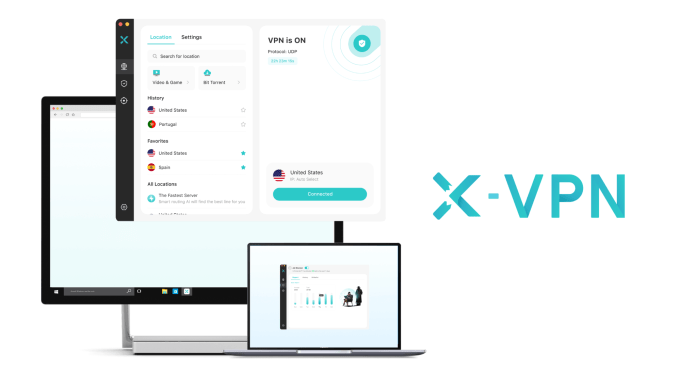
X-VPN’s app experience is straightforward in a good way. The main connection button is easy to find, the layout is clean, and the setup process does not feel heavy. You do not need to understand VPN protocols or server routing before using the app.
At the same time, the app does not feel overly stripped down. Server selection is easy to access, protocol settings are visible, and the more advanced tools are available without making the interface feel crowded. That gives X-VPN a useful balance: simple enough for people who just want to connect, but not so simplified that experienced users feel locked out of control.
The free version is also easy to start using because it does not require registration or an email address before connecting. That lowers the barrier for users who want to try the service first. Instead of creating an account just to test whether the app works, users can install it and connect quickly.
Platform support is broad as well. X-VPN is available on Windows, macOS, iOS, Android, Chromebook, and Chrome Extension. That makes it practical for people who move between a laptop, phone, tablet, and browser-based work. The overall experience stays consistent enough that switching devices does not require relearning the app.
The best thing about X-VPN’s usability is that it does not make the product feel more complicated than it needs to be. The app is approachable, but the feature set underneath is deeper than the first screen suggests.
Server Network: Wide Coverage for Streaming, Travel, and Region Switching
X-VPN’s premium network includes 10,000+ servers in 80 countries. That gives the service broad geographic coverage for streaming, travel, gaming, and general region switching. A larger network can also make it easier to find a suitable route when one server is crowded or when a platform is more selective about VPN traffic.
The premium plan also includes dedicated servers for streaming and gaming. That matters because users do not always want to manually test different locations to find one that works. Dedicated options make the app feel more organized and reduce guesswork, especially for streaming.
The free version is also stronger than many free VPN offerings. It includes 1,000+ free servers across 26 locations, including popular regions such as the US, Canada, the UK, France, and Germany.
Overall, X-VPN’s server network is one of the reasons the service feels well-rounded.
Pricing and Value
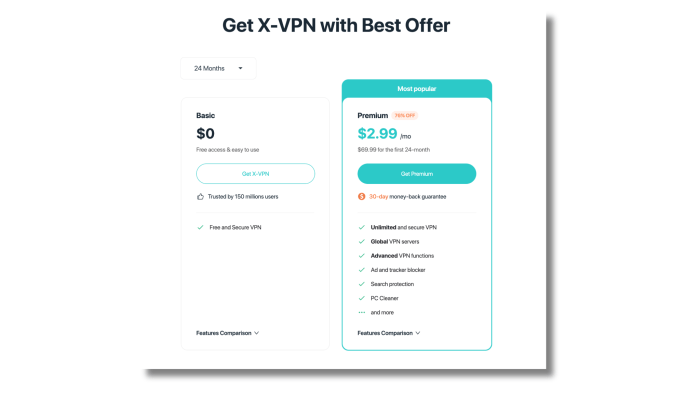
X-VPN’s premium pricing starts at $2.99 per month on the 24-month plan, and it includes a 30-day money-back guarantee. That places it in a competitive range, especially when considering the server network, streaming support, protocol options, and security tools included in the plan.
The value case is not only about the monthly price. A VPN can be inexpensive and still feel limited if speeds are weak, streaming is unreliable, or the apps are frustrating. X-VPN’s combines several useful areas in one package: fast speeds, dedicated streaming support, a large premium network, open-source protocol options, a proprietary protocol for restrictive networks, and a broader set of privacy tools.
The free version also improves the value story because it gives users a low-friction way to try the product. No registration is required to begin using it, and the free server network is larger than what many users might expect from a free VPN.
For the price, X-VPN feels competitive. It is especially appealing for users who want one VPN that can handle speed, streaming, privacy tools, and everyday usability without becoming difficult to manage.
Final Verdict
For privacy-sensitive users, X-VPN is one of the more credible options in 2026. It passes the tests that actually matter: no IP, DNS, or WebRTC leaks; a working kill switch; strong encryption with post-quantum and Tor-over-VPN options; an audited no-logs policy; and a jurisdiction outside the major intelligence-sharing alliances.
The everyday experience is fast and stable enough that you will not be tempted to disable the VPN to load a page faster. That last point is easy to overlook, but it is the difference between a VPN that protects you and a VPN that sits unused.
It is not just a service for casual users who want to unblock Netflix. It is a service that holds up when you actually look closely at the privacy claims, which is exactly what privacy-sensitive users should be doing before they trust any VPN.
FAQ
Is X-VPN good enough for privacy-sensitive users?
Yes. X-VPN passes the checks that matter most for privacy-focused users: no IP, DNS, or WebRTC leaks in our testing, a working kill switch, AES-256 encryption, post-quantum protection, an audited no-logs policy, and a Singapore-based jurisdiction. The bundled browser protection suite adds another layer beyond the encrypted tunnel.
Is X-VPN worth using in 2026?
Yes. X-VPN is worth using in 2026 if you want a VPN with fast speeds, strong streaming support, broad server coverage, transparent protocol options, and a simple app experience. It also includes useful privacy tools such as tracker blocking, malicious website blocking, download protection, URL cleaning, and an ad blocker.
Is X-VPN fast?
Yes. X-VPN performed very well in our speed testing. On a high-bandwidth test line, our no-VPN baseline was 3506 Mbps, while VPN-connected download speeds stayed between 2676 Mbps and 2794 Mbps across local, UK, Germany, and US servers. Your exact speeds will depend on your own network and location, but X-VPN showed strong consistency across distance.
Is X-VPN good for streaming?
Yes. X-VPN worked well with major streaming platforms in our testing, including Netflix, Hulu, BBC iPlayer, Amazon Prime Video, Disney+, YouTube TV, ESPN, and HBO Max / Max. Netflix support was especially strong, with access to multiple regional libraries including the US, Australia, Canada, Japan, South Korea, Spain, and the UK.
Does X-VPN keep logs?
No. X-VPN follows a no-logs policy and does not collect activity data such as browsing history, visited websites, DNS queries, user IP addresses, downloaded content, VPN connection timestamps, VPN servers used, destination IP addresses, or sensitive payment details. A third-party no-logs policy audit is completed, which is a positive step for privacy transparency.
Which protocols does X-VPN support?
X-VPN supports WireGuard, OpenVPN, V2Ray, and Everest. Users can choose protocols directly by name in the Protocol section of VPN Settings when using the X-VPN.